If you happen to experience this problem, might want to try the method mentioned in the link below
http://www.sysprobs.com/language-bar-missing-vista-windows-7
Basically is to add one more entry in
HKEY_LOCAL_MACHINE\SOFTWARE\Microsoft\Windows\CurrentVersion\Run
with the following string value "ctfmon"="CTFMON.EXE"
After that, restart your machine.
Friday, October 15, 2010


Tuesday, August 31, 2010
Cannot access Microsoft website or others antivirus website
If you having this problem of not able to access Microsoft website including their Windows Update site, there is a possibility your PC is infected by conflicker virus. To verify it, go to this website.
There are few conflicker removal tools in the web and you can easily google it. However since conflicker also prevent you from going to some antivirus webpage, you have to use other non-infected PC to download any tools from the antivirus webpage or find a third party webpage that host the conflicker removal tool like this.
There are few conflicker removal tools in the web and you can easily google it. However since conflicker also prevent you from going to some antivirus webpage, you have to use other non-infected PC to download any tools from the antivirus webpage or find a third party webpage that host the conflicker removal tool like this.
Monday, July 26, 2010
How to install RapidSVN on CentOS
To start off, you need to grab the necessary rpm packages. Just go to pbone and type RapidSVN and wxGTK in the search box. and look for the correct rpm packages that match your OS. Besides this, you also need to have subversion, instead of using rpm, i am going to use yum to do it Link to launch the RapidSVN Subversion Client
 RapidSVN GUI Interface
yum install subversion
After that, install wxGTK follow by rapidSVN.
rpm -ivh wxGTK-2.8.9-1.el5.rf.i386.rpm
rpm -ivh rapidsvn-0.9.6-2.el5.rf.i386.rpm
If everything done nicely, you should be able to launch RapidSVN as below
 Link to launch the RapidSVN Subversion Client
 RapidSVN GUI Interface
Sunday, June 13, 2010
Make your media player "Always On Top" of other windows
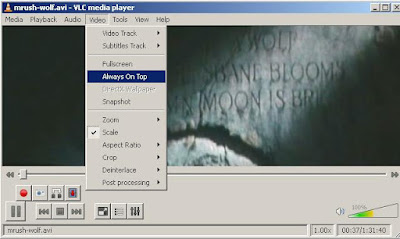
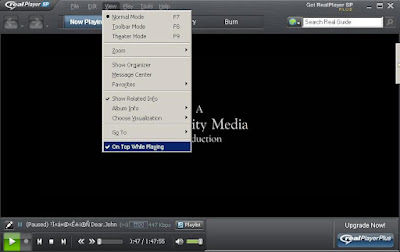
This is a very useful feature which can allow you to watch video while surfing net, especially if you are surfing those Paid To Click (PTC) pages. This post will show you how to set the "Always On Top" feature on the following media player.
VLC Media Player
Windows Media Player
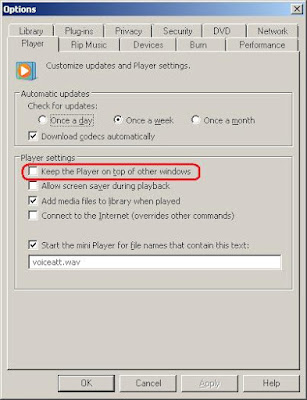
For Windows Media Player, you need to go to Tools->Options... and the setting is under Player tab.
Real Player
VLC Media Player

Windows Media Player
For Windows Media Player, you need to go to Tools->Options... and the setting is under Player tab.

Real Player

Monday, May 17, 2010
Install 2008 R2 on ESX 3.5 with Dell T410
If you encounter the following message when you try to install 2008 R2 as a VM in Dell T410:
Windows failed to start. A recent hardware or software change might be the cause... File: \windows\system32\boot\winload.exe Status: 0xc000035a Info: Attempting to load a 64-bit application, however this CPU is not compatible with 64-bit mode.
you need to enable virtualization technology to overcome this problem
 From BIOS screen, go to Processor Settings
 Change "Virtualization Technology" to "Enabled"
Windows failed to start. A recent hardware or software change might be the cause... File: \windows\system32\boot\winload.exe Status: 0xc000035a Info: Attempting to load a 64-bit application, however this CPU is not compatible with 64-bit mode.
you need to enable virtualization technology to overcome this problem
 From BIOS screen, go to Processor Settings
 Change "Virtualization Technology" to "Enabled"
Friday, January 8, 2010

Sunday, November 1, 2009
Dell T410 pictures
T410
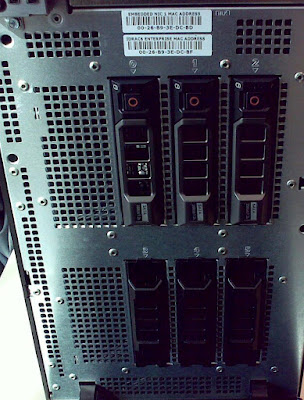 This configuration can put in 6 3.5" harddisk
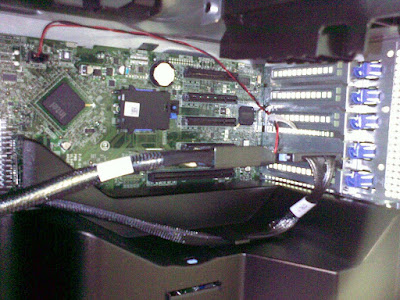 T410 internal: There are 5 PCIe slots and take note that one slot is being used by the SAS card. All slots are PCIe Generation 2 except for slot 3.
 This configuration can put in 6 3.5" harddisk
 T410 internal: There are 5 PCIe slots and take note that one slot is being used by the SAS card. All slots are PCIe Generation 2 except for slot 3.
Subscribe to:
Posts (Atom)