Wednesday, September 14, 2011

How to change boot order for Ubuntu (>9.10)

1. cat /boot/grub/grub.cfg
see the order of the wanted kernel. Starts from 0.

Example:
...
### BEGIN /etc/grub.d/10_linux ###
menuentry 'Ubuntu, with Linux 2.6.35-30-server' --class ubuntu --class gnu-linux
# this is 0
--class gnu --class os {
recordfail
insmod part_msdos
insmod ext2
set root='(hd0,msdos1)'
search --no-floppy --fs-uuid --set 71119ab7-e93f-49a9-80f1-efc11398c954
linux /boot/vmlinuz-2.6.35-30-server root=UUID=71119ab7-e93f-49a9-80f1
-efc11398c954 ro quiet
initrd /boot/initrd.img-2.6.35-30-server
}

# this is 1
menuentry 'Ubuntu, with Linux 2.6.35-30-server (recovery mode)' --class ubuntu -
-class gnu-linux --class gnu --class os {
recordfail
insmod part_msdos
insmod ext2
set root='(hd0,msdos1)'
search --no-floppy --fs-uuid --set 71119ab7-e93f-49a9-80f1-efc11398c954
echo 'Loading Linux 2.6.35-30-server ...'
linux /boot/vmlinuz-2.6.35-30-server root=UUID=71119ab7-e93f-49a9-80f1
-efc11398c954 ro single
echo 'Loading initial ramdisk ...'
initrd /boot/initrd.img-2.6.35-30-server
}

# this is 2
menuentry 'Ubuntu, with Linux 2.6.32-28-server' --class ubuntu --class gnu-linux
--class gnu --class os {
recordfail
insmod part_msdos
insmod ext2
set root='(hd0,msdos1)'
search --no-floppy --fs-uuid --set 71119ab7-e93f-49a9-80f1-efc11398c954
linux /boot/vmlinuz-2.6.32-28-server root=UUID=71119ab7-e93f-49a9-80f1
-efc11398c954 ro quiet
initrd /boot/initrd.img-2.6.32-28-server
}

# this is 3
menuentry 'Ubuntu, with Linux 2.6.32-28-server (recovery mode)' --class ubuntu -
-class gnu-linux --class gnu --class os {
recordfail
insmod part_msdos
insmod ext2
set root='(hd0,msdos1)'
search --no-floppy --fs-uuid --set 71119ab7-e93f-49a9-80f1-efc11398c954
echo 'Loading Linux 2.6.32-28-server ...'
linux /boot/vmlinuz-2.6.32-28-server root=UUID=71119ab7-e93f-49a9-80f1
-efc11398c954 ro single
echo 'Loading initial ramdisk ...'
initrd /boot/initrd.img-2.6.32-28-server
}
### END /etc/grub.d/10_linux ###
...

2. vi /etc/default/grub
change GRUB_DEFAULT=0 value to wanted kernel

Example:

If we want to boot to 'Ubuntu, with Linux 2.6.32-28-server' we should set 2

3. run update-grub to update

4. reboot and check with uname -r to see if correct kernel selected.

Sunday, July 31, 2011

Saturday, July 23, 2011

Bluetooth disappear after reformat Dell Inspiron 1525

If you are not able to turn on your bluetooth after reformat and reinstall your inspiron 1525 laptop. You might want to try the following patch from Dell


Or do a google search on the following keywords

BTW Radio ON, A00

Friday, July 22, 2011

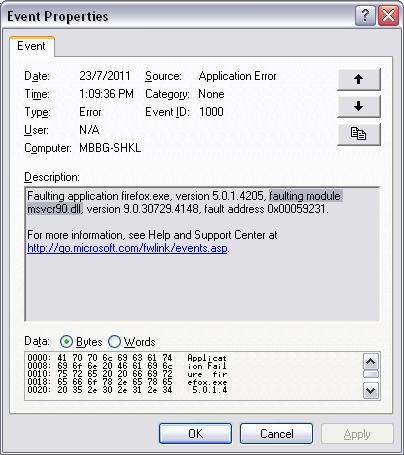
firefox crash - msvcr90.dll

If you encounter firefox crashing whenever you open some webpage, you might need to disable some add-ons for the browser, and most of the time, the add-on you might want to disable is AVG safe-search.

To disable it, go to Tools-Add-ons and select Extensions. Disable the add-on and restart your browser


If you look at Windows event-viewer, this is the likely entry you will see

p.s. if you experience the same thing for I.E, disable AVG safe-search might also be your solution.

Wednesday, April 20, 2011

Mount NFS shared on ESX -notes

Few things to take note:

If you encounter the following error and are sure that your NFS server firewall is ocnfigured properly or disable

 mount: mount to NFS server 'hostname' failed: System Error: Connection refused  

You might want to try this this

 esxcfg-firewall -e nfsClient

If you encounter the following error:

 mount.nfs Input/output error

You might want to check your portmap status and start it if is stopped.

Check ths status

 service portmap status

Start the service

 service portmap start

Wednesday, March 30, 2011

VMware ESX 4.1 smb - How to mount CIFS drive

For shared drive without domain:

[user@system ~]mount -t cifs //192.168.123.123/share /mnt/CIFS -o username=Administrator

For shared drive with domain:

[user@system ~]mount -t cifs //192.168.123.123/share /mnt/CIFS -o username=Administrator,workgroup=Domain


Wednesday, March 9, 2011

Ksym Dependancy - rpm

If you encounter some ksym (..) dependancy problem when installing kmod package, you might want to try the --nodeps switch.

rpm -ivh --nodeps kmod.something.rpm

Some quote from the HP website

"RPM uses KMP packaging dependency data to ensure the dependencies are met
before installing the binary RPM. Red Hat maintains a whitelist of kernel
symbols which RPM uses to validate against the KMP binaries. Some symbols may
be in the kernel but not on the whitelist which results in a failed binary RPM
install. The user will need to use the "--nodeps" switch when installing the
binary."