Sunday, August 23, 2009

Screen capture program to capture mouse pointer

If you wat to do screen capture to also include mouse pointer, this program will come in handy. Furthermore, it is free. :)

With Windows Screen Capture key

With ScreenHunter program:

How to connect to hidden accesspoint on Windows Vista

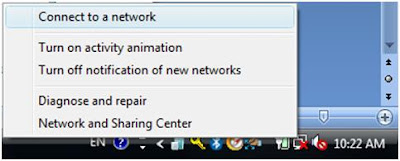
1. Right click on the network icon on your right below tasbar and select "connect to a network" as shown

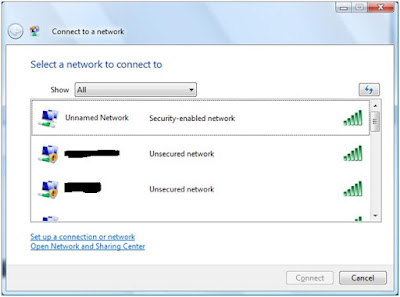
2. On the "Select a network to connect to" window, click on "Setup a connection or network".


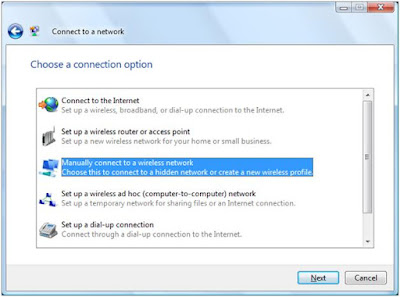
3. On the "Choose a connection option", select "Manually connect to a wireless network".


4. On the next window, you need to keyin the required information. For the option "Connect even if the network is not broadcasting", please visit this link to learn more about the secuirity issue on this opton.

5. And lastly, just select "Connect to...".

Wednesday, August 19, 2009

Where to download Brocade/Cisco firmware?

As you know, HP also sell Brocade/Cisco FC switchs which they rebrand them to storageworks B-series/C-series switches. You can actually get the firmware from their site. Just click this.

Thursday, August 6, 2009

Task Scheduler - problem running the vbs

If you encounter task scheduler try to run your vbs task which involve action on network drive but fail. Besides looking at security permission, please also check the following setting shows on the picture below. Make sure is "Run only when user is logged on". If you choose the "Run whether user is logged on or not", you might not run your task with the intended user and thus fail.

Windows 2008 Task Scheduler

Tuesday, July 28, 2009

Nokia E71 - How to type underscore "_"

Apparently underscore is not part of the symbol can be found on the keypad. To type it, you have to press the "Ctrl" key once and select this symbol from the on screen symbol table. This key is located at the bottom right corner of your phone keypad as shown in the picture below.

Wednesday, July 22, 2009

Script for event log backup

Simple script to do the event log backup using wevtutil, this is an unpolished script, please use it with care. wevutil is supported on Windows 2008 and Windows Vista.

'Backup event log script

'Get the current date and time
CurrentDate = now

sAcceptableChars = "abcdefghijklmnopqrstuvwxyz0123456789"

'Remove "/", ":", " " from CurrentDate and put it
'in FixDate

For x = 1 to Len(CurrentDate)
ch = mid(CurrentDate, x, 1)
If InStr(sAcceptableChars, LCase(ch)) > 0 Then
FixDate = FixDate & ch
End If
Next

Set wshShell = WScript.CreateObject ("WSCript.shell")

'Start to do event log backup

wshshell.run "C:\Windows\System32\wevtutil cl _
Application /bu:E:\AppEvent_" & FixDate & ".evt", 1, True

wshshell.run "C:\Windows\System32\wevtutil cl Security _
/bu:E:\SecurityEvent_" & FixDate & ".evt", 1, True

wshshell.run "C:\Windows\System32\wevtutil cl Setup _
/bu:E:\SetupEvent_" & FixDate & ".evt", 1, True

wshshell.run "C:\Windows\System32\wevtutil cl System _
/bu:E:\SystemEvent_" & FixDate & ".evt", 1, True

set wshshell = nothing

Monday, July 13, 2009

How to move your shape data text box in Visio 2007

To do this, you have to use "Text Block Tool" as shown below.


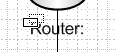
Once you select this, move your mouse pointer over any shape data text box and you can start to move shape data text box when your mouse pointer change to overlapped double rectangle as shown below.